plafle's blog

plafle's blog

the pursuit of rationalism

CSAPP lecture 6

1. Condition code

  • Four condition codes:

    • CF: Carry Flag. Will be 1 if there is a carry out of the most significant bit. Used to detect the overflow of the unsigned number
    • ZF: Zero Flag. Will be 1 if the most recent operation yield 0.
    • SF: Sign Flag. Will be 1 if the most recent operation yield a value with the sign bit being 1.
    • OF: Overflow Flag. Will be 1 if the most recent operation caused an overflow (for two’s complement), either positive overflow or negative overflow.

    The leaq operation would not alter any of the condition code. All other arithmetic operation would make these condition code to change.

  • For the logical operation (such as xor or add), they will leave the CF and OF to be 0.

  • For the shift operation, the CF will be set to the last digit shifted out, and the OF will be set to 0.

  • For the inc and dec operation, they will set the OF and ZF, but they will leave the CF unchanged.

  • There are two instruction classes which can only alter the condition codes without changing the other value.

​ We can check the sign of a value or whether this value is 0 by test %rax %rax. (Suppose this value is stored in register %rax)

2. Access the condition code

  • Access the condition code: Rather than directly access the condition code, we prefer to access the condition code indirectly, using the following 3 methods:
    • We can set a single byte to 0 or 1, depending on some combination of the condition codes.
    • We can conditionally jump to some part of the program
    • We can conditionally transfer data.
2.1 How to set a single byte according to the condition code

​ These set class of instruction have a single operand D indicating the destination. The destination have to be a register or a memory location. If it is a register, then it would set the least significant byte of the register to 1 (usually this register have to be %al kind rather than %rax kind.)

​ an example:

1
2
3
4
5
comp:
cmpq %rsi %rdi
setl %al
movzbq %al %rax
ret
2.2 (Conditionally) jump to some part of the program

Unconditionally jump:

1
2
3
4
5
	movq $0, %rax
jmp .L1
movq (%rax), %rdx
.L1:
popq %rdx

The jmp instruction would jump to .L1 label

jmp is the unconditional jump operation. It can jump directly or indirectly. When it is directly, it’s something like jmp .L1. When it is indirectly, it is something like jmp *%rax or jmp *(%rax), where the label is stored in the register %rax or the memory location (%rax)

Conditional jump:

2.3 Jump instruction encodings

​ In assembly code, to specify where we want to jump to we can simply write something like .L1 happily. In the disassembled machinery code (the assemble code translated from the machinery code), the jump operation would written in the form like jmp 0x1137. There will be an address operand like 0x1137 to specify which operation will the program jump to. In this case, the jump operation would jump to 0x1137 and do the operation in 0x1137

​ But in machinery code, how to specify where we want to jump to? There are two ways to do this, first is so called PC relatives. That is saying, they encode the target address as the difference between the target address and the address of the instruction immediately following the jump instruction.

The difference between a and b is a - b

​ The reason why we try to use this kind of notation is that the jump target would remain unchanged when the whole program is shifted to another address.

1
2
eb 03 # In this case, 0x03 is the encoded jump target. 0x03 has to be 							added by the address of the next instruction to get the 								target address. 
# "eb 03" is a machine code in binary. "eb" specifies the type of the operation and "03" specifies the encoded jump target

Note: this 0x03 is a two’s complement number, so for example, if now it is 0xFF, then it is actually -1, and the actual jump target would be the address of the next instruction minus 1.

Question

​ Sometimes we would see operation jmp .L1 and sometimes we would see operation jmp 0x1137. Which one (probably both) is the assembly code? What’s difference between these two command?

2.4 Conditional Move

​ Apart from the jump operation, we have an operation called conditional move.

1
2
3
4
5
6
7
long comp(long x,long y) {
long res;
if (x < y)
res = y - x; else
res = x - y;
return res;
}

For example, this C code might be translated into the following assembly code:

1
2
3
4
5
6
7
8
absdiff:
movq %rsi, %rax
subq %rdi, %rax
movq %rdi, %rdx
subq %rsi, %rdx
cmpq %rsi, %rdi
cmovge %rdx, %rax #If the last comparison said "%rdi >= %rsi", then this move will conditional move will apply. Otherwise nothing will happen.
ret

Question

​ Why will the conditional move operation reduce the penalty for misprediction? It also need to decide whether to do the move instruction, and the misprediction should affect the following pipeline as well.

The class of conditional move:

​ Some property for the conditional move:

  • The destination must be register
  • The data type can be 2,4,8 bytes long, but can’t be 1 byte long
  • The instruction don’t need a suffix to specify the data type. The processor could infer the operand length from the name of the destination register.

The condition move may not be valid if one expression is invalid.

for example

1
2
3
4
int *p;
if (!p)
return 0; else
return *p;

You can not calculate *p beforehand as p may be a null pointer, making the dereferencing invalid.
$$
\int\sqrt{a^2 - x^2}dx = \frac x2\sqrt{a^2 - x^2} + \frac {a^2}2\arcsin(\frac xa) + C
$$
$$
\int \frac 1{\sqrt{x^2 \pm a^2}}dx = \ln|x + \sqrt{x^2 \pm a^2}| + C
$$
$$
\int \sqrt{x^2 \pm a^2}dx = \frac x2 \sqrt{x^2 \pm a^2} \pm\frac {a^2}2\ln|x + \sqrt{x^2 \pm a^2}| + C
$$

1. Git本地基本操作

0. 一些英语翻译
  • stage : 暂存区
  • index: 暂存区
  • working tree: 当前HEAD指向的版本
  • working directory: 工作区
1.创建本地仓库

​ 随便新建一个文件夹,然后执行

1
$ git init

​ 于是这个文件夹就变成了一个本地仓库(会出现一个叫做.git的隐藏文件夹)

2. 一些术语
  • 工作区:就是你在电脑中能看到的目录(即那个文件夹)
  • 暂存区:简单理解的话,就是文件被add之后就会被复制一份并且存储在暂存区
  • github本地仓库:简单理解的话,就是commit之后文件去的地方
  • 版本库:包含了暂存区和本地仓库
3. 四个状态,一些操作
  • 四个状态:untrackedunmodifiedmodifiedstaged

  • 在工作区中新建一个文件之后,输入git status,会发现这个文件是untracked状态
  • 当我们add了这个文件之后,这个文件的状态变为staged,进入了暂存区
  • 然后我们commit这个文件,完成commit之后这个文件库中的文件和本地文件又变为一致,此时这个文件状态变为unmodified

  • 当我们在add完文件之后再对这个文件进行修改,此时这个文件会变成modified状态,并且使用git status命令时会提示我们这个文件被修改了。此时我们可以使用git checkout -- 文件名操作将这个文件回溯为暂存区中的版本。
  • 当我们add并且commit完文件之后再对这个文件进行修改,那么这个文件会变成modified状态。此时我们依旧可以使用git checkout -- 文件名操作将这个文件回溯为本地库中的版本。
  • 如果本地库中的文件版本与工作区的不同,即使我们add了工作区中的文件,这个文件的状态依旧是modified。此时如果我们对这个文件进行checkout,这个文件的内容不会有任何改变。
  • 如果工作区的文件,暂存区的文件和本地库中的文件版本各不相同,那么git checkout -- 文件名会把工作区的文件回溯为暂存区中的版本。

一言以蔽之,在这个文件addcommit之后再做修改,这个文件的状态就会变成modified。然后如果对这个文件执行git checkout --,就会把这个文件回溯到最近一次git commitgit add时候的状态。

4. git log命令

​ 输入git log之后进入一个页面,可以按回车不停往下翻;可以按下键盘上的Q键退出日志;

git log中最重要的部分在于它会显示每个提交的hash值。

5. 如何查看Git中的文件内容和文件目录?
  • 如何查看工作区的文件内容&文件目录? 用文件资源管理器 或 分别用lscat命令

  • 如何查看本地仓库中的文件目录?

    1
    $ git ls-tree HEAD
  • 如何查看本地仓库中的某个文件内容?

    1
    $ git show <commit>:<file>   # <commit>是提交的hash值或分支名,<file>是文件名

    1
    $ git show HEAD:<file>      # 直接查看当前分支中某个文件的内容
  • 如何查看暂存区中的文件目录?

    1
    $ git ls-files
  • 如何查看暂存区中的文件内容?

    1
    $ git show :<file>
6. Git的撤销与回退

git reset实现版本回退:

  • 版本回退可以用git reset命令。
1
2
3
4
$ git reset HEAD^    		# 撤销到上一个版本
$ git reset HEAD^^ # 撤销到上两个版本
$ git reset HEAD~100 # 撤销到上100个版本
$ git reset <commit hash> # 撤销至某一个提交(commit hash是git log中的那串16进制数字,不需要全部输完,只需要输前几个数字就可以了)
  • git reset可以带一些参数,一般有三种版本:

    • mixed,即默认版本,最常用,执行之后移动HEAD指针,同时回溯暂存区,但不动工作区
    • soft,使用方法举例:git reset --soft HEAD^,执行之后移动HEAD指针,不动暂存区和工作区。
    • hard,使用方法举例:git reset --hard HEAD^,执行之后即移动HEAD指针,又动暂存区,还动工作区
  • git reset之后发现reset错了,想回到reset之前的较新的版本,怎么办?

    没事,只要找到较新的那个版本的commit hash,然后还是用git reset <commit hash>就可以了(这里的<commit hash>是那个较新版本的commit hash

  • git reset之后发现reset错了,而且还手滑关掉了命令行窗口,重新打开之后输入git log发现找不到那个较新版本的commit hash,怎么办?

    没事,输入git reflog就可以看到之前提交的commit hash了。


git reset也可以实现把已经添加到暂存区的对于某个文件的修改撤销掉:

1
$ git reset HEAD <file_name>
7. 文件的删除与恢复
  • 删除工作区的文件:rm <filename>

  • 删除完工作区的文件之后如果这个文件之前被add或者commit过,那么可以

    git checkout -- <filename>来恢复。


  • 先执行rm <filename>,再执行git rm <filename>,那么执行完之后这个文件在工作区和暂存区中都被删掉了

  • 这个时候可以:先git reset HEAD <filename>将文件从本地仓库恢复到暂存区,然后再

    git checkout -- <filename>将文件从暂存区恢复到工作区


  • 如果直接执行git rm <filename>,然后git commit -m "message",那么文件会在工作区中保留,然后再暂存区和本地仓库中都消失。

2. Git远程库

1.建立SSH连接

​ 这一步是要让本地PC与远程github建立SSH连接,具体方法为:

  • 打开powershell管理员模式,输入

    1
    $ ssh-keygen -t rsa -C "youremail@example.com"

    注意:这里的email地址就写注册github时候用的就可以

  • 在C盘用户主目录下找到.ssh文件夹,进入,打开id_rsa.pub,复制其中的内容

  • 登录github打开“Account settings”,“SSH Keys”页面:

然后,点“Add SSH Key”,填上任意Title,在Key文本框里粘贴id_rsa.pub文件的内容:

  • 点“Add Key”,你就应该看到已经添加的Key:
2. 连接远程仓库

在本地仓库中git bash here,然后在git中输入:

1
$ git remote add origin <ssh>

这里的<ssh>是github上的仓库中的ssh端口地址

然后这里的origin是我们给远程库设置的名字

3. 将本地库的内容推送到远程仓库
  • 第一次推送的时候用这个命令:
1
$ git push -u origin master

​ 注:git push命令实际上是把当前分支master推送到远程

​ 由于远程库是空的,我们第一次推送master分支时,加上了-u参数,Git不但会把本地的master分支内容推送的远程新的master分支,还会把本地的master分支和远程的master分支关联起来,在以后的推送或者拉取时就可以简化命令。

  • 之后推送的时候就直接:
1
$ git push origin master

​ 可以把本地master分支的最新修改推送至GitHub

4. 断开本地库和远程库之间的连接
1
$ git remote rm origin

用这个命令可以断开本地库和远程库之间的连接

3.在Vscode中使用Git

1.可能会遇到的第一个问题

​ 当你打开vscode的source control模块时,vscode可能会认为你还没有安装git,并建议你安装git。可是你明明已经安装过了git,于是你觉得很奇怪。这里的原因在于你还没有更改vscode的路径。具体方法如下:

  • 打开vscode,按下ctrl + ,,在settings中打开搜索栏,搜索git.path
  • 点击Edit in settings.json文件,进入这个json文件
  • 复制你的git.exe的路径,它应该长成D:\application\Git\bin\git.exe这样。把这个路径复制到那个json文件”git.path”后面
  • 把你复制的路径中的\全部改成\\,不然会报错
  • 最终应该长成这样:"git.path": "D:\\application\\Git\\bin\\git.exe"(你的路径肯定跟我不一样)
  • 重启vscode

1.char *s[] 若执行s++,则:

2.char **s 若执行s++,则:向后一个指针的大小(一般为4个字节)

3.char (*s)[] 则s是指向一行的指针,若执行s++,则s会指向下一行

4.int **a 若执行a++,则:向后一个指针的大小(一般为4个字节)

5.int *a[] 若执行a++,则:

6.int (*a)[] 则a是指向一行的指针,若执行a++,则a会指向下一行

  • 1和2如果写在函数的形参里面,那么是等价的。
  • 4和5如果写在函数的形参里面,那么是等价的。
  • 如果1不是写成函数的形参,那么s就是一个常量,不能更改。
  • 如果2不是写成函数的形参,那么s就是一个变量,可以更改。
  • 3和6都是指向一行的指针
1
2
3
int b[105][105];
int **a = b;
//不能这样写,因为b是指向行的指针
1
2
3
int b[105][105];
int **a = &b[0];
//b[0]是常量,一般取不了

一般来说,二级指针是和指针数组相关联的int (*a)[] 这种是和二维数组相关联的。

1
2
3
4
5
6
7
8
9
10
11
12
13
14
15
16
17
18
19
#include<stdio.h>

char *s[105];

void work(char **s) {
puts(*s);
s++;
puts(*s);
s++;
puts(*s);
}

int main() {
s[0] = "123";
s[1] = "abc";
s[2] = "ABC";
work(s);
return 0;
}
1
2
3
123
abc
ABC

观察这段程序,问题出在哪里?

1
2
3
4
5
6
7
8
9
10
11
12
13
14
#include<stdio.h>

int a[2][3] = {{2,3,4},{1,2,3}};

void fun(int (*p)[]) {
printf("%d\n",**p);
p+=1;
printf("%d\n",**p);
}

int main() {
fun(a);
return 0;
}

问题:没有声明所指向的一行有多少个元素,改为:

1
2
3
4
5
6
7
8
9
10
11
12
13
14
#include<stdio.h>

int a[2][3] = {{2,3,4},{1,2,3}};

void fun(int (*p)[3]) {
printf("%d\n",**p);
p+=1;
printf("%d\n",**p);
}

int main() {
fun(a);
return 0;
}

即可。


如果声明了int *a = malloc(size);,那么之后可以用a[i]表示*(a + i)

$\hspace{1cm}$设想在一条道路上随机选择一个位置,然后降落到这个位置。

$\hspace{1cm}$接着你测量从这个位置到道路开始位置的距离(记为l1),以及从这个位置到道路结束位置的距离(记为l2)。

$\hspace{1cm}$如果这条道路是无限长的,那么我们可以断言,l1和l2都是无穷大的概率为1

$\hspace{1cm}$反过来说,如果l1或l2中的一个是有限的,那么我们可以断言,这条道路长度是有限的的概率是1

$\hspace{1cm}$我的出生就好似在人类的历史进程中随机选择了一个时间降生

$\hspace{1cm}$从人类出现到我出生所经过的时间好比上文中的l1,从我出生到人类灭绝所经过的时间好比上文中的l2

$\hspace{1cm}$我无从得知l2是多少,但是我目前可以明确:l1是有限的

$\hspace{1cm}$所以我可以得到推论:人类的历史极大可能是有限的,人类最终会灭绝的概率是1。

应该要掌握的STL

1. vector

​ 假设我们有一个vector<typename> 变量v,那么我们就可以有如下操作:

  • v.push_back(obj),可以在v的最后插入一个obj

  • v.pop_back()可以弹出v最后一个元素

  • v.size()可以返回v中元素的个数

  • 可以直接通过v[i]访问vector中的元素

    1
    2
    for (int i=0; i<v.size(); i++)
    #可以直接用v[i]访问vector中的元素
  • sort(v.begin(),v.end(),cmp)可以对v进行排序

  • v.clear()清空vector v

2.priority_queue(优先队列,即堆,默认大根堆)

​ 假设我们有一个priority_queue<node>变量heap,那么我们就可以有如下操作:

  • heap.push(obj)可以把一个元素加入堆

  • heap.pop()可以弹出堆顶元素

  • node tmp = heap.top()可以获得堆顶元素

  • 自定义结构体类型的重载运算符

    1
    2
    3
    4
    5
    6
    7
    struct node {
    int x,id;
    }
    bool operator < (const node &a, const node &b) {
    return a.x < b.x; //以x为关键字从大到小实现大根堆
    return a.x > b.x; //以x为关键字从小到大实现小根堆
    }

3.lower_bound & upper_bound(可以对数组和vector )(注意需要事先排序)

  • int tmp1 = lower_bound(a + 1,a + n + 1,obj) - a返回数组a中第一个大于等于obj的元素的下标

  • int tmp2 = upper_bound(a + 1,a + n + 1,obj) - a返回数组a中第一个大于obj的元素的下标。

  • int tmp1 = lower_bound(v.begin(),v.end(),obj) - v.begin()返回数组a中第一个大于等于obj的元素的下标

  • int tmp1 = upper_bound(v.begin(),v.end(),obj) - v.begin()返回数组a中第一个大于obj的元素的下标

4.unqiue (可以对数组和vector) (注意需要事先排序)

1
2
3
4
5
6
int a[] = {0,2,5,3,2,3,5};
sort(a + 1,a + 7);
int m = unique(a + 1,a + 7) - a - 1;
printf("m = %d\n",m);
for (int i=1; i<=m; i++)
printf("%d\n",a[i]);

输出:

1
2
3
4
m = 3
2
3
5

5.bitset

  • 新建一个长度为30的bitset并给它赋值为abitset<30> s(a);
  • 可以直接用s[i]访问这个bitset,既可以取值,也可以修改。注意:s[0]是最低位,s[29]是最高位。
  • 可以把两个bitset互相做位运算,也可以对两个bitset== != 的比较,还可以对bitset进行左移右移。
  • s.count()返回有几个1
  • 如果s所有位全部是0,那么s.any()返回Falses.none()返回True
  • 如果s至少有一位是1,那么s.any()返回Trues.none()返回False
  • 一个使用实例
1
2
3
a = 20;
bitset<20> s(a);
printf("%d\n",s);
1
20
  • 注意:s[0]的类型不是int,但可以强制转换为int,所以可以这样int tmp = s[0],但不能printf("%d\n",s[0]),如果要直接printf,那么应该printf("%d\n",(int)s[0]).

6. multiset/set

所有multiset的操作只要把“multiset”换成”set”就可以了,故下面用multiset演示

  • 声明方式:multiset<int> smultiset<node> s;

    ​ 注意,如果用了后者,那么需要重载<运算符,重载方法和前面在priority_queue里面重载的方法一样。然后,setmultiset默认都是从小到大排序的,所以如果要按照node里的x关键字排序,重载函数应该这样写:

    1
    2
    3
    bool operator < (const node &a, const node &b) {
    return a.x < b.x;
    }
  • multiset的迭代器的概念:

    • 声明一个multiset的迭代器:multiset<node>::iterator it;
    • multiset的迭代器仅支持++--两个操作,分别表示在multiset中向后或者向前一个元素
    • 如果我们有一个multiset的迭代器it,可以通过*it来表示迭代器it指向的元素(有点像一个指针)

假设我们有一个multiset<int> s;

  • s.size(), s.erase(), s.clear()均支持。

  • s.insert(obj)可以实现往里面插入元素的功能

  • s.find(obj)可以返回一个multiset的迭代器,如果找不到对应元素那么就会返回s.end(),否则返回对应元素的迭代器,可以通过*运算得到对应元素。

  • it是一个multiset的迭代器,那么s.erase(it)可以删除这个迭代器对应的元素。

  • s.erase(obj)可以删除所有对应元素。

  • s.count(obj)可以返回s中有多少个元素等于obj

  • s.lower_bound(obj)可以返回第一个大于等于obj的元素的迭代器

    s.upper_bound(obj)可以返回第一个大于obj的元素的迭代器


  • 可以通过这个方式输出multiset s中的元素(默认是从小到大排序的)

    1
    2
    for (multiset<int>::iterator it = s.begin(); it != s.end(); it++)
    printf("%d ",*it);

7. pair

  • 声明方法:pair<typename1,typename2> tmp;

    例如:pair<pair<int,int>, vector<int> > tmp;

  • 一种构造方法:pair<int, int> p = make_pair(2,3)

  • 假设我们有一个pair<int, int> p; 那么可以通过p.firstp.second分别访问第一个元素和第二个元素。

8. map

  • map也有insert(), clear(), empty()的操作

假设我们有一个map<int,int> mp;和一个map<int,int>::iterator it;

  • map里插入一个键值对:mp.insert(make_pair(2,3))

  • 删除迭代器it对应的元素:mp.erase(it)

  • 删除map中的pairmp.erase(make_pair(2,3))

  • 通过key来删除map中的pairmp.erase(2)

  • mp.find(make_pair(2,3))m中找对应元素,返回迭代器。如果不存在,返回mp.end()

  • mp[key]返回key值对应的value,可以直接赋值或访问(和python里的字典一样),如果不存在mp[key],则直接新建一个空二元组(key,zero)

臆想

很久很久以前,在某个地方,突然出现了一所监狱。

这所监狱很大,很大,很大,没有人知道它到底有多大。这所监狱很深,很深,很深,没有人知道它到底有多深。最奇怪的是,这所监狱是凭空产生的,没有人知道它到底是怎么来的。

又过了很久很久,一件更奇怪的事情开始发生了:每隔一段时间,就会有一批犯人被送进这所监狱。你若问他:”你原来来自哪里?你犯了什么罪?“,他只会回答:”我不知道。“

这所监狱里也有许多怪物,能随意地穿越墙壁,过道,房间,它们的日常娱乐即为折磨犯人。红色的怪物喜欢粗暴地折断犯人的躯干或四肢,蓝色的怪物喜欢掏出犯人的脏器,在上面动一点小手脚,然后再把它塞回去,让犯人慢慢死去。还有一种紫色的怪物,它最喜欢干的事情是将一些食物抛在犯人们之间,接着它就在旁边旁观犯人们为了争抢食物而相互厮杀。

这所监狱区别于其他监狱最大的特点在于它时刻允许犯人们越狱。在每个犯人的房间里面,都有一个传送门。只要几分钟时间,犯人就可以通过这道传送门越狱。面对监狱里那些恐怖怪物的折磨,一开始,绝大多数的犯人都选择了越狱,因此,在相当长的一段时间里,这所监狱里空无一人。

你也许会问我,这批越狱的犯人后来去了哪里?过得怎样?我只能回答你,我不知道,因为我从未穿越过传送门,也从来没有见到有犯人从传送门中回来。这个监狱里的犯人曾对监狱外的世界做过种种猜测,但没有人知道真相究竟是如何。

可是,有一天,一批特殊的犯人被送了进来。这批犯人和以前送来的犯人没有任何区别,除了一点:他们的身体构造出现了一些变化,使得他们在穿越传送门越狱的那几分钟里会莫名其妙地感受到巨大的痛苦。就是因为这个变化,这批犯人中的绝大多数都没有选择越狱。就这样,原本空无一物的监狱渐渐被这类犯人充满。

对于犯人们,时间艰涩地流过。他们无时无刻不在期待着穿过传送门,可是只有少数勇士做到了,大多数只能在黑暗中祈祷自己不是怪物的下一个目标。

由于这个特殊的机制,这个监狱已经存在了好久好久,而且也可以预见它还可以继续存在很久很久。但是,经过很久很久之后,监狱的墙会和门融合,壁会和杆融合,任何地方一切的一切会和任何地方的一切的一切融合,直到分不清彼此。据说,到那时候,上帝将会摧毁这座监狱,释放其中所有的犯人。

期待这一天早日到来吧

以上是一名犯人写下的一点文字。

想法来自一个同学的说说,稍微做了一点改动:

我们总是觉得年纪越大时间过得越快,其实不然。童年时觉得时间过得很慢,是因为我们在彼时将精力全部投入在观察现实世界中。而随着年龄的增长,我们会把越来越多的时间用来回忆过去和遥想未来。关照现在的时间变少了,就会感到时间变得飞快,仿佛俯仰之间白驹已过隙。

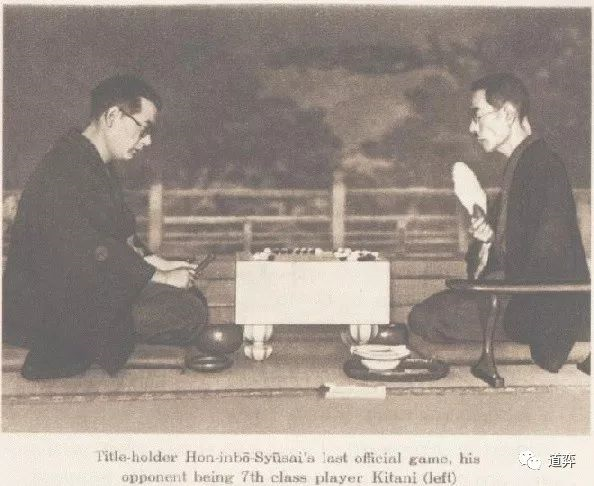
1938年11月,一间禅房中,两人以跪姿相对而坐。右首脊背笔挺,手摇折扇的是本因坊世家第二十一代”不败名人“,本因坊秀哉九段。虽仍为一头黑发,却早已年过花甲。秀哉自知年岁已大,且疾病缠身,大约大限之期不远矣,遂有意下一盘隐退棋。这盘棋的对手是从数百名职业棋手中脱颖而出青年棋手,木谷实七段。比赛于6月24日开始,木谷实执黑,秀哉执白。

2小时前,秀哉从容落下白96手,蛤基石与榧木棋盘间发出碰撞声。接下来2小时,两人好似入定,禅院中空气似乎也已凝固。这样的状态已持续4个月,并且还会再延续2个月。6个月的时间中,禅院外是隆隆的火炮爆裂声,而禅院的灯光下,只有清脆的落子声,其余便是时间积淀成的寂静。

1992年,大洋彼岸的英国牛津,37岁的数学教授Andrew Wiles正坐在自己的阁楼中。5年前,随着一系列的学术进展,已经尘封358年的费马大定理似乎有了研究的方向。Wiles 在那时感觉到证明费马大定理的时间已经来到,遂推掉了其他所有学术研讨会,钻进自己的阁楼中,对大定理发起冲击。5年来,他每天只做一件事:证明费马大定理。除了睡觉和吃饭,他将自己所有的时间都埋入阁楼里的草稿纸中。

1995年,Andrew Wiles终于成功证明了费马大定理,8年阁楼中的研究岁月换来的是一份写满138页A4纸的证明。2005年,Wiles来到北大交流时,北大数学系院长张继平感慨到:”如今还有多少人能静下心来,花8年时间认认真真只做一件事情呢?“

的确,现在这样的人已经很鲜见了。一盘围棋赛的时间从半年变为区区5小时,一项研究的平均时间也从8年变为如今的一个月甚至更少。随着社会的发展,我们要做的事情越来越多,而做每件事情的时间却越来越少,对应的,生活也变得越来越琐碎。时代的快车拽着我们一路飞奔,时间被划分成越来越小的片段。

或许,我们真的应该慢下来,用一生时间做一件事情,这样的生活或许难以实现,但真的很浪漫。

  • 问题: 在一条长度为1的线段上随机撒两个点$A$,$B$, 求线段$AB$的期望长度

  • 解:设在一条长度为1的线段上随机撒的两个点$A$,$B$所截得的线段期望长度为$x$

    ​ 然后将这条长度为1的线段均分成左右两段:

    • 若$A,B$两点都在左半部分,那么发生这种情况的概率为0.25,期望长度为$\frac 12 x$

    • 若$A,B$两点都在右半部分,那么发生这种情况的概率为0.25,期望长度为$\frac 12 x$

    • 若$A,B$两点横跨线段中点,那么发生这种情况的概率为0.5

      ​ 设线段中点为$M$,那么$E(|AB|) = E(|AM|) + E(|MB|)$ $= 0.25 + 0.25 = 0.5$

      ​ 所以这种情况下期望长度为0.5

    所以,根据期望的定义,我们可以得到$x = 0.25 \times \frac 12 x + 0.25 \times $ $\frac 12 x + 0.5\times 0.5$

    解得:$x = \frac 13$

0%